
Visual
Data Visualization
Consistent data visualizations enhance Fannie Mae’s position as an industry leader and foster trust in our expert housing and economic research.
Getting started
- Choose a chart type appropriate for your data. The Data Visualization Catalogue is a good resource.
- Often, it’s better to highlight key points rather than overwhelm the user with a lot of information. When determining what data to display, consider the context, main takeaways, and audience.
- Consider the amount of attention the chart will likely get and how much engagement you’re asking for. If the chart is too complex, consider breaking it up.
- When writing your chart title and summary, ask yourself: What is the main takeaway from this chart? What does this chart inform the reader in the context of the entire piece?
Chart typography
All our data visualizations use our brand font Source Sans Pro and follow our Editorial Guidelines, including using sentence case titles.
We have two sets of chart sizes: web and PDF, which come in standard and half-size. Web and PDF use slightly different font sizes (see typography chart).
Generally, do not add any padding between your chart and the left edge of the artboard. This will allow the chart to line up cleanly with text in the final layout.
Note: For all sizes, you may need to export as a higher multiple or vector to ensure quality.
Web
- Web standard | 700px, exported at 2x for a final width of 1400px.
Matches the width of the container on standard Drupal pages. - Web half | 350px, exported at 2x for a final width of 700px.
Matches half the width of the container on standard Drupal pages, used for simple graphs. These can be placed side-by-side in a standard-width Drupal container, usually divided by a 1px width line in Fannie Mae Grey (#edebe9).
Example of web standard chart
All text is in Source Sans Pro
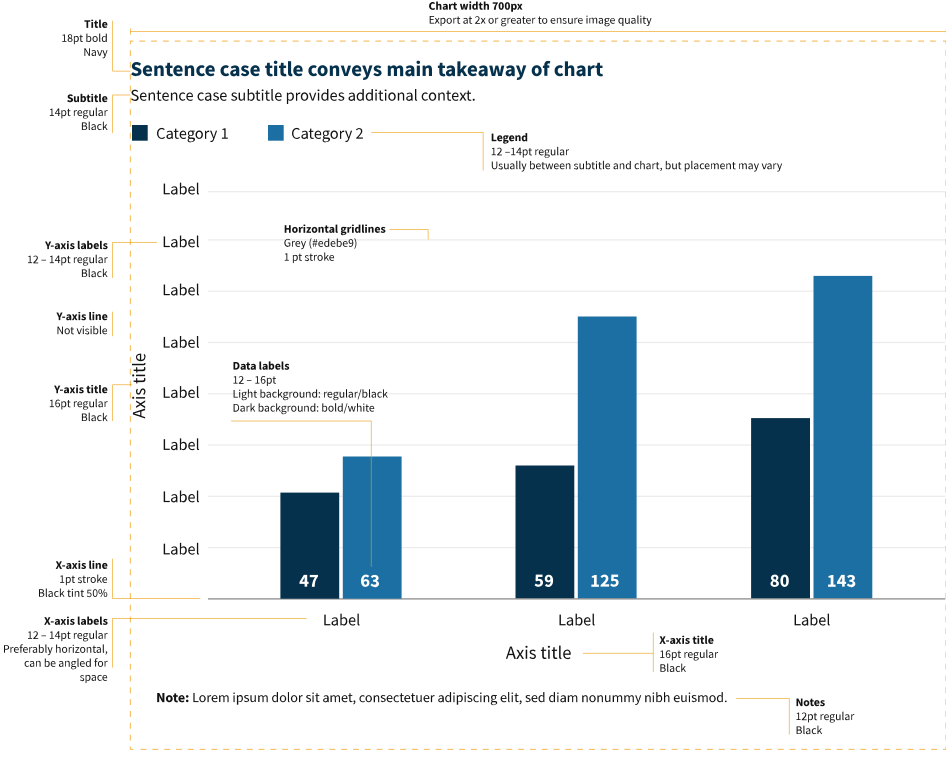
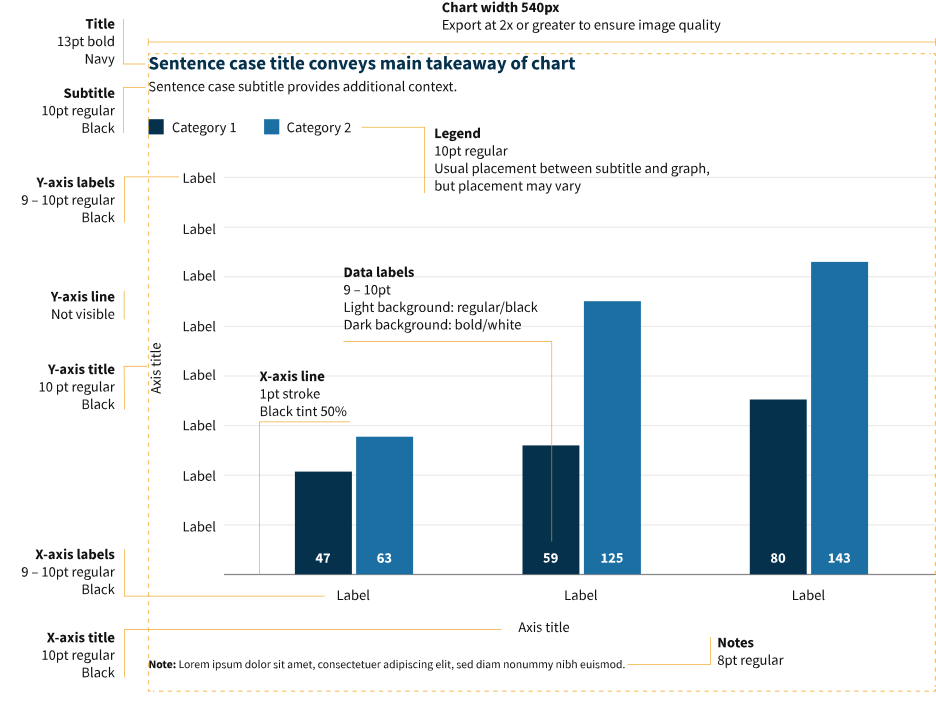
- PDF standard | 540px, exported at 2x for a final width of 1080px.
Fills the entire space within the margins in our standard PDF templates. - PDF half | 256.5px, exported at 2x for a final width of 513px.
Fills the width of one column in our standard PDF templates.
Example of PDF standard chart
All text is in Source Sans Pro
Typography chart
- Standard and half-size graphs use the same font sizes.
- Titles are usually left-aligned but can be center-aligned if there is a compelling layout reason.
- For print applications, change Fannie Mae Black (#121212) to process black.
| Chart part | Font | Color | Font size (web) | Font size (PDF) |
|---|---|---|---|---|
| Title | Source Sans Pro Bold | Navy (#05314d) | 18pt | 13pt |
| Subtitle | Source Sans Pro Regular | Black (#121212) | 14pt | 10pt |
| Legend | Source Sans Pro Regular | Black (#121212) | 12 – 14pt | 10pt |
| Axis title | Source Sans Pro Regular | Black (#121212) | 16pt | 10pt |
| Axis labels | Source Sans Pro Regular | Black (#121212) | 12 – 14pt | 9 – 10pt |
| Data labels | Source Sans Pro Regular on white, Bold on color | Black (#121212) | 12 – 16pt | 9 – 10pt |
| Notes | Source Sans Pro Regular | Black (#121212) | 12pt | 8pt |
Readability
Whenever possible, use the following techniques to improve the readability of your charts.
Simplify
Avoid making your chart too crowded or busy. Do not pack graphic elements too close together.
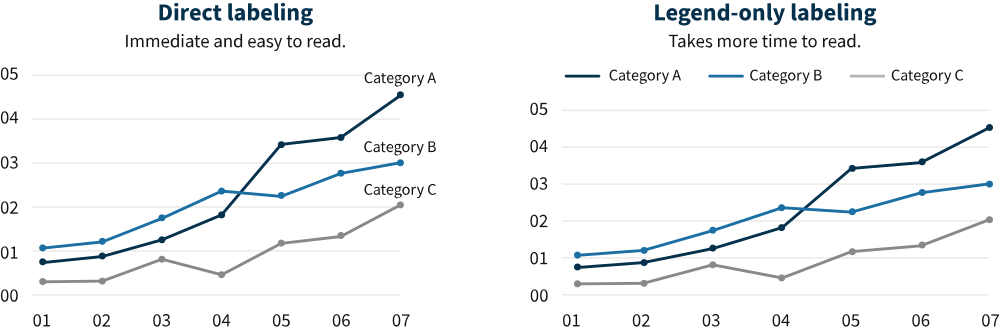
Direct labeling
Direct labeling improves chart comprehension by allowing viewers to read the categories as they go, rather than relying on the legend.
Segment dividers
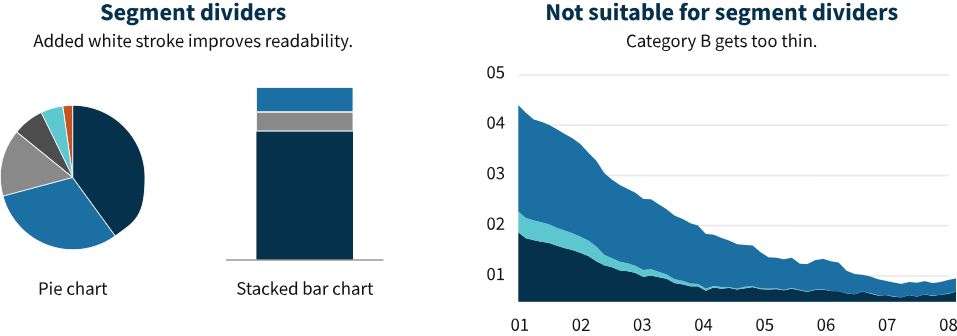
Segment dividers make it easier to distinguish individual chart sections. To use segment dividers, add a white stroke (usually 1px) to the shapes in your graph or chart.
Occasionally, segment dividers may not be suitable for your chart. This usually happens when one or more categories have a very low value and adding the strokes would get in the way of reading the data.
Color
We have provided palettes for multiple types of datasets; choose the one that matches your needs. All palettes are intended for use on white backgrounds.
Types of palettes:
- Categorical: the most common type of data visualization; categories of data have no inherent sequence.
- Sequential: used for data that has an inherent sequence, such as amount or intensity.
- Likert scale: used for Likert scale survey data (strongly agree/agree/neutral/disagree/strongly disagree/don’t know).
- Line graphs: line graphs use a unique palette.
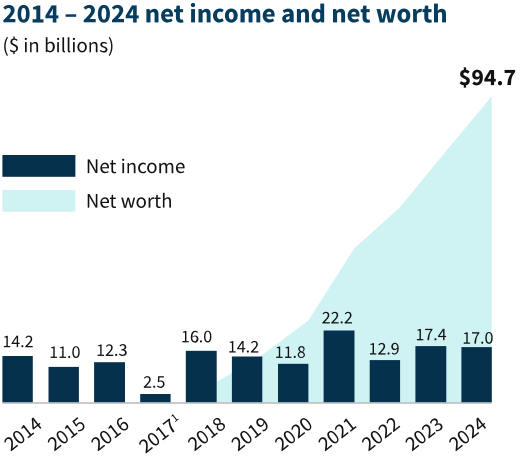
- Bar/area compound charts: bar/area compound charts use a unique palette.
Do
 Ensure the overall look of the graph fits the Fannie Mae brand, emphasizing our signature and primary brand colors. Use our signature Navy and primary colors (Blue, Grey) for the largest values, followed by our secondary (Teal, Orange), and finally tertiary (Green, Yellow, Magenta).
- Use Fannie Mae Navy for Fannie Mae-related data.
- Ensure sufficient contrast for readability when putting text on a solid color background. Recommendations for text color have been provided on all swatches.
- Contact Creative Studios if none of the color palettes meet your data visualization needs.
Don't
 Use Fannie Mae Navy for values that may be controversial. In these cases, swap Navy for our brand Black (#121212).
- Use secondary/tertiary colors for the largest data points present.
- Use color as the only way of communicating information. Supplement with labels or other supporting copy.
- Mix and match from color palettes or incorporate new colors.
- Add colored backgrounds to your charts.
- Use multiple colors without any reason from the underlying data to do so, e.g., purely for looks.
Special colors
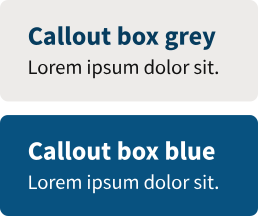
Grey
#edebe9
Use for background elements (like horizontal gridlines) and also callout boxes.
Black tint
50% #898989
Use for darker background elements, such as axis lines.
Blue
#085280
Use for callout boxes.
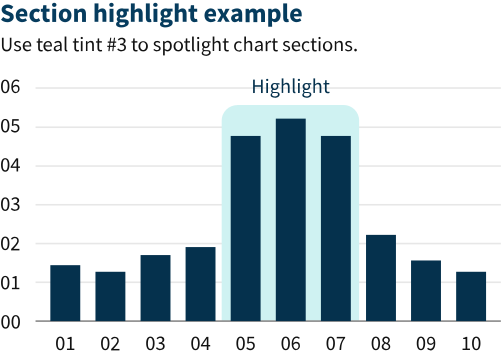
Teal tint 3 #cff2f2
Use in a rounded shape to highlight a section of a chart.
Categorical color palettes
Categorial palettes are used for data with no inherent sequence.
- Standard palettes should be used in most cases.
- Alternate palettes are reserved for situations when the standard palette doesn’t suit the data.
- Neutral palettes use only Black and Greys, and only exist for one-, two-, and three-category datasets. Use these for data where it is important for Fannie Mae to remain completely neutral.
When mapping the palette to your data, consider the following:
- Use the order of the palettes as a general guide for mapping colors to your data.
- Palettes have been set up generally in order of how much each color should be present (primary, then secondary, then tertiary colors).
- Palettes alternate between dark and light colors as much as possible to maximize readability and visual balance. This is important when working with directly adjacent color blocks (e.g., in pie, stacked bar, and area charts).
- If you have similar categories, consider using similar colors from the palette for that data.
- Be mindful of color associations (e.g. blue tends to be associated with positive; grey, with neutral; orange, with warning).
One group
Navy
#05314d
Standard
Black tint
50% #898989
Neutral
Two groups
Navy
#05314d
Blue tint 1
#1c6fa3
Standard
Navy
#05314d
Black tint 50%
#898989
or
Teal tint 1
#5dc7d0
or
Orange
#c55422
Alternate
Black
#121212
Black 50%
#898989
Neutral
Three groups
Navy
#05314d
Black tint 50%
#898989
Blue tint 1
#1c6fa3
Standard
Navy
#05314d
Black tint 50%
#898989
or
Blue tint 1
#1c6fa3
Teal tint 1
#5dc7d0
or
Orange
#c55422
Alternate
Black
#121212
Black tint 50%
#898989
Black tint 25%
#4d4d4d
Neutral
Four groups
Navy
#05314d
Black tint 50%
#898989
Blue tint 1
#1c6fa3
Black tint 25%
#4d4d4d
Standard
Navy
#05314d
Black tint 50%
#898989
Blue tint 1
#1c6fa3
Teal tint 1
#5dc7d0
or
Orange
#c55422
Alternate
Five groups
Navy
#05314d
Black tint 50%
#898989
Blue tint 1
#1c6fa3
Black tint 25%
#4d4d4d
Teal tint 1
#5dc7d0
or
Orange
#c55422
Standard
Six groups
Navy
#05314d
Black tint 50%
#898989
Blue tint 1
#1c6fa3
Black tint 25%
#4d4d4d
Teal tint 1
#5dc7d0
Orange
#c55422
Standard
Seven groups
Navy
#05314d
Black tint 50%
#898989
Blue tint 1
#1c6fa3
Black tint 25%
#4d4d4d
Teal tint 1
#5dc7d0
Orange
#c55422
Green
#2c6937
Standard
Sequential color palettes
Sequential palettes are used for data that has an inherent sequence, such as amount or intensity.
Two groups
Navy
#05314d
Blue tint 1
#1c6fa3
Three groups
Navy
#05314d
Blue tint 1
#1c6fa3
Blue tint 2
#509ed5
Four groups
Navy
#05314d
Blue
#085280
Blue tint 1
#1c6fa3
Blue tint 2
#509ed5
Five groups
Black
#121212
Navy
#05314d
Blue
#085280
Blue tint 1
#1c6fa3
Blue tint 2
#509ed5
Six groups
Black
#121212
Navy
#05314d
Blue
#085280
Blue tint 1
#1c6fa3
Blue tint 2
#509ed5
Blue tint 3
#98c6e6
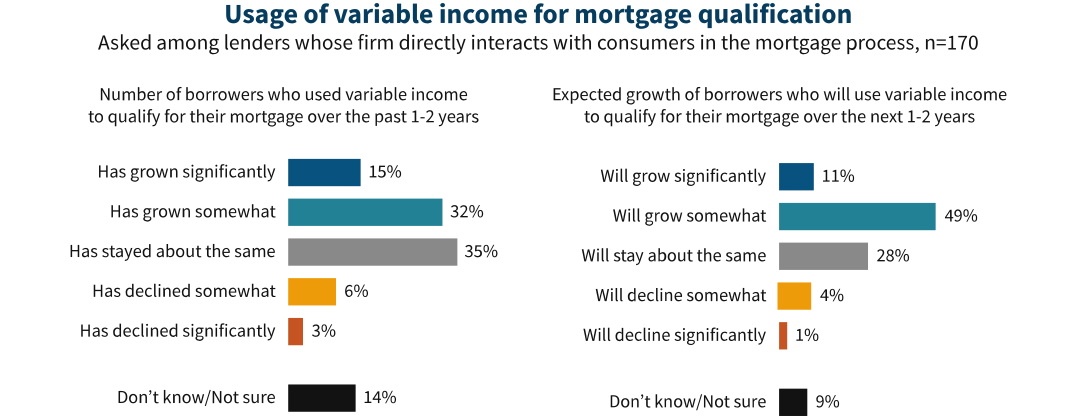
Likert scale palette
Use this palette for survey data using the Likert scale format.
Likert scale
Orange
#c55422
Yellow shade 1
#ee9b09
Black tint 50%
#898989
Teal
#238196
Blue
#085280
Black
#121212
Strongly
disagree
Disagree
Neutral
Agree
Strongly
agree
Not sure
Orange
#c55422
Strongly
disagree
Yellow shade 1
#ee9b09
Disagree
Black tint 50%
#898989
Neutral
Teal
#238196
Agree
Blue
#085280
Strongly
agree
Black
#121212
Not sure
Line graph background palette
The line graph palette incorporates more secondary/tertiary backgrounds and brighter tints to ensure lines are easily distinguishable. Do not use this palette for other types of data visualization.
When creating a line graph, consider that it may be more on-brand and readable to use fewer backgrounds and instead employ different types of lines to convey data types or data markers. Examples of different line types include long and short dashes; dotted lines; and combinations of dashes and dots. However, be cautious that you do not make your graph too busy or hard to understand. Readability comes first.
Line graph palette
Line 1: Navy (#05314d)
Line 2: Blue tint 1 (#1c6fa3)
Line 3: Black tint 50% (#898989)
Line 4: Teal tint 1 (#5dc7d0)
Line 5: Orange tint 1 (#e66e39)
Line 6: Green tint 1 (#418152)
Line 7: Magenta tint 1 (#c44786)
Line 8: Yellow (#ffb400)
External links are solely for educational purposes and do not imply any endorsement or approval by Fannie Mae.